

Remote Desktop Manager
Devolutions inc. · Utilities
Independent analytics for this App Store listing. AppTracker is not affiliated with Devolutions inc.
Chart standing · US
What changed · US
Listing changes AppTracker has observed for this app in this storefront — new versions, price moves, rating shifts, and store copy.
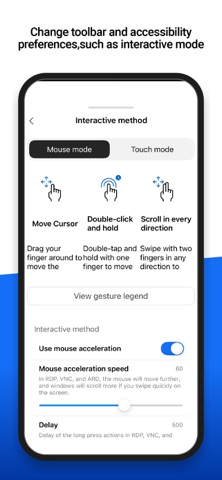
=== RDM (iOS) 2026.3.0.19 === New Features - (Experimental) - Added support for real touch input when using touch mode in an RDP session - Added a "Show hidden files" option for FTP entries - Added support for VMware entries - Added the ability to request more time for an active PAM checkout and approve or deny extension requests - Added webcam support to IT Assets Improvements - Added a magnifier button option for remote sessions that zooms in while held and zooms back out when released - Added an action to check in entries checked out by other users - Added an option to disable automatic mouse movement toward the session boundaries when dragging in RDP, VNC, and ARD sessions - Added automatic clipboard clearing after a delay when copying a secret and prevented copied secrets from syncing to other Apple devices via Universal Clipboard - Added partial support for symbolic links in SCP, FTP, and SFTP - Added support for AWS Dashboard SSO login and multi-tenancy - Added TOTP support for Hudu credentials - Created a migration utility to migrate from a local workspace to a Cloud workspace - Improved the check-out and check-in experience for folders and multiple entries - Improved the expiration warning for secure messages - Improved the Recovery Key experience with clearer validation feedback - In SFTP sessions, you can now transfer files as text and specify line endings - PAM accounts now appear directly in shared vaults, with check-out, connect, and credential actions available directly from the account, replacing the now-decommissioned PAM Dashboard entry - Removed unsupported languages that were still listed as available - The app now checks the Cloud status page to provide more accurate messages during service disruptions - You can now preselect a credential from a list when linking to another vault Fixes - Fixed an issue where Cloud workspaces did not offer to go offline after a failed refresh - Fixed an issue where deep links could fail if the target workspace wasn't already open - Fixed an issue where folder contents were not sorted alphabetically in some cases - Fixed an issue where Portuguese was not working correctly - Fixed an issue where the app could freeze when autofilling credentials on websites using a self-signed certificate, and where login fields could sometimes remain empty - Fixed an issue where View Password did not work with 1Password when 2FA was enabled
Price & rating history · US
Reconstructed from the listing changes AppTracker has observed in this storefront. A field is charted once it has changed more than once, and each line starts at the value it moved from.
Average rating · ★ 3.75 now · 3 changes on record
Ratings breakdown · US
The star breakdown behind this app's rating in this storefront.
In-app purchases · US
No in-app purchases.
Screenshots



About
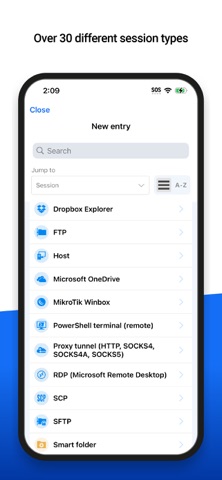
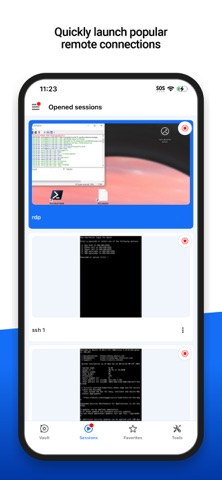
Remote Desktop Manager for iOS is a free tool that enables access to all your remote connections and passwords. Centralize your connections in workspaces and access your data from anywhere, from in the field with RDM mobile! Remote Connections ================ Remote Desktop Manager for iOS supports Microsoft Remote Desktop Protocol (RDP), VNC, Apple Remote Desktop (ARD), SSH Shell, SSH Tunnel, Proxy Tunnel, Telnet, FTP, TFTP, SFTP, SCP, Active Directory Console, WebDAV, Google Drive, Microsoft OneDrive, Microsoft RDP Gateway, Azure Blob Storage Explorer, Amazon AWS Dashboard, Amazon S3 Explorer, Website, SSH Port forward, Dell iDRAC, Dropbox Explorer, HP iLO, BeyondTrust Password Safe and BeyondTrust Password Safe Dashboard. Once configured, connections to your remote servers, virtual machines and other workstations can be easily launched using a single tap. Password Management ================= Along with remote connections, Remote Desktop Manager for iOS lets you save and manage your passwords and credentials from your centralized database or your local XML file. Easily input your credentials and automatically sign in everywhere. Credentials ========= RDM supports generic credentials as well as the following integrations: 1Password, Bitwarden, Dashlane, Keeper, LastPass, One Time Password, Passportal, Password Manager Pro, Passwordstate, Pleasant Password Server, RoboForm, Secret Server, Sticky Password, TeamPass, True Key, and Zoho Vault, in addition to our own products, Devolutions Cloud and Devolutions Server. Database ======= Remote Desktop Manager for iOS supports these workspaces: -Devolutions Server -Devolutions Cloud - XML File
What's new · 2026.3.0
=== RDM (iOS) 2026.3.0.19 === New Features - (Experimental) - Added support for real touch input when using touch mode in an RDP session - Added a "Show hidden files" option for FTP entries - Added support for VMware entries - Added the ability to request more time for an active PAM checkout and approve or deny extension requests - Added webcam support to IT Assets Improvements - Added a magnifier button option for remote sessions that zooms in while held and zooms back out when released - Added an action to check in entries checked out by other users - Added an option to disable automatic mouse movement toward the session boundaries when dragging in RDP, VNC, and ARD sessions - Added automatic clipboard clearing after a delay when copying a secret and prevented copied secrets from syncing to other Apple devices via Universal Clipboard - Added partial support for symbolic links in SCP, FTP, and SFTP - Added support for AWS Dashboard SSO login and multi-tenancy - Added TOTP support for Hudu credentials - Created a migration utility to migrate from a local workspace to a Cloud workspace - Improved the check-out and check-in experience for folders and multiple entries - Improved the expiration warning for secure messages - Improved the Recovery Key experience with clearer validation feedback - In SFTP sessions, you can now transfer files as text and specify line endings - PAM accounts now appear directly in shared vaults, with check-out, connect, and credential actions available directly from the account, replacing the now-decommissioned PAM Dashboard entry - Removed unsupported languages that were still listed as available - The app now checks the Cloud status page to provide more accurate messages during service disruptions - You can now preselect a credential from a list when linking to another vault Fixes - Fixed an issue where Cloud workspaces did not offer to go offline after a failed refresh - Fixed an issue where deep links could fail if the target workspace wasn't already open - Fixed an issue where folder contents were not sorted alphabetically in some cases - Fixed an issue where Portuguese was not working correctly - Fixed an issue where the app could freeze when autofilling credentials on websites using a self-signed certificate, and where login fields could sometimes remain empty - Fixed an issue where View Password did not work with 1Password when 2FA was enabled
Details