

Clean Text
Ivan Gobbo · Productivity
Independent analytics for this App Store listing. AppTracker is not affiliated with Ivan Gobbo.
Chart standing · US
What changed · US
Listing changes AppTracker has observed for this app in this storefront — new versions, price moves, rating shifts, and store copy.
* Optimized for iPhone Duo. * New app icon with a more contemporary look. * Home Screen widget: open clipboard text in Clean Text with a single tap. * Confirmation banners after every action on text and notes, providing clear and immediate feedback. * Find actions and tasks faster with smart search in the Actions bar. * Various code optimizations and small improvements.
In-app purchases · US
What this app sells inside itself, grouped by kind and priced for this storefront.
Screenshots



About
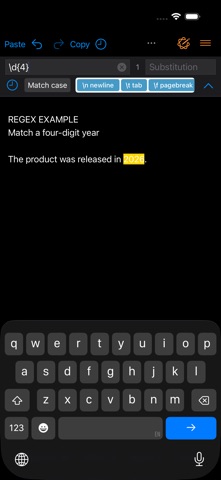
Clean Text helps you edit, correct, and organize text quickly and reliably, making everyday writing tasks easier. It’s designed for anyone who works with text: writers, students, developers, marketers, and anyone who copies and pastes content between different apps. From fixing formatting issues to preparing clean, readable text for emails, documents, websites, and social posts, Clean Text keeps your work consistent and well organized. Complete Text Cleanup Clean Text solves the most common formatting problems that appear when copying text from emails, PDFs, web pages, or chat messages. Remove empty lines, extra spaces, tabs, unwanted characters, smart quotes, or line breaks in seconds. A rich set of cleanup tools lets you standardize content with a single tap, making even the messiest text immediately usable. Editing with Apple Writing Tools Clean Text supports Apple Writing Tools, integrating them alongside all the classic text cleaning and formatting features. You can use them to correct, rewrite, summarize, and improve your text directly in the app. AI-based features are always optional and are only activated when you choose to use them. Powerful Find and Replace Real-time search instantly highlights all matches in the text, making it easy to locate words, phrases, or patterns even in long documents. Options like Case Sensitive and Whole Word give you precise control, while the live preview makes replacements safe and reliable. Recent Texts and Smart History Quickly access recently copied texts and reuse previously applied transformations to speed up repetitive workflows. Seamless Cross-Device Integration Thanks to iCloud, you can start working on iPhone or iPad and instantly find your text on your other devices. Recent changes are always available, with no manual steps required. Designed for iOS and iPadOS Clean Text integrates naturally with the system: • Dark Mode support • iPad multitasking • External keyboards and shortcuts • Context menus and system integrations Key Features: • Smart Clean and Clean & Compact • Clean clipboard content without pasting • Fix spaces, lines, and paragraphs • Convert tabs, spaces, and quotation marks • Text case conversion (uppercase, lowercase, title case, sentence case) • Indentation tools and line numbering • Line sorting and reordering • Encoding and decoding (URL, Base64, ROT13) • Convert HTML to plain text • Creative text transformations • Text statistics (characters, words, lines) • Find and replace with real-time highlighting • Regular expression support • Ignore List to protect specific words • Shortcuts and automation support Clean Text for iPhone and iPad is aligned with the macOS version in features and behavior, delivering a consistent experience across platforms with over 100 text transformation actions. AI Features Note AI-based features are separate from traditional tools and are never applied automatically. Apimac continues to independently develop and improve all classic text cleaning and formatting features. Subscriptions and Purchases With the purchase you unlock all the app’s core features. In addition, subscribers benefit from continuous improvements, new features, and regular updates delivered to the app over time. Plans available: • Monthly subscription: 1-month free trial, then automatically renews at the monthly price • Annual subscription: 1-month free trial, then automatically renews at the annual price • Lifetime purchase: one-time payment with unlimited access to all features and continuous improvements Subscriptions renew automatically unless cancelled at least 24 hours before the end of the period. You can manage or cancel your subscription anytime in your App Store account settings. Privacy Policy: https://www.apimac.com/about/privacy/ Terms of Use (EULA): https://www.apple.com/legal/internet-services/itunes/dev/stdeula/
What's new · 27
* Optimized for iPhone Duo. * New app icon with a more contemporary look. * Home Screen widget: open clipboard text in Clean Text with a single tap. * Confirmation banners after every action on text and notes, providing clear and immediate feedback. * Find actions and tasks faster with smart search in the Actions bar. * Various code optimizations and small improvements.
Details