

IPMask - network address calculator
Aleksei Neronov · Utilities
Independent analytics for this App Store listing. AppTracker is not affiliated with Aleksei Neronov.
Chart standing · US
What changed · US
Listing changes AppTracker has observed for this app in this storefront — new versions, price moves, rating shifts, and store copy.
IPMask is back on Apple Watch. • Enter an address with the keypad and turn the Digital Crown to set the prefix. • Network, broadcast, first and last host, hosts, netmask and wildcard on your wrist, with the 32-bit bar. • Works without the iPhone nearby.
Ratings breakdown · US
The star breakdown behind this app's rating in this storefront.
Screenshots


About
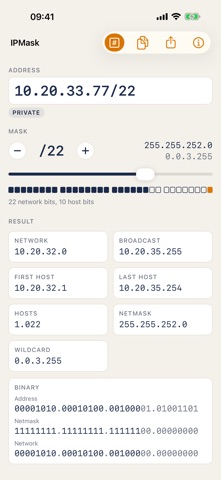
IPMask works out an IPv4 network from an address and a mask: network and broadcast address, first and last host, number of hosts, netmask and wildcard. • Type the address the way you have it: 192.168.1.1, 192.168.1.1/22 or with a dotted mask. • Move the mask slider and watch the 32 bits split into the network part and the host part. • See the address type at a glance: private, public, loopback, link-local, multicast. • Switch to the binary view to see the address, netmask and network bit by bit. • Copy the whole result as text or share it. • On Apple Watch: enter an address with a keypad, turn the Digital Crown to set the prefix and read the result on your wrist. /31 point-to-point links (RFC 3021) and /32 host routes are handled correctly. Made for network engineers, students and anyone who sets up a router at home. The app works offline; it needs a connection only for the small ad banner.
What's new · 3.1
IPMask is back on Apple Watch. • Enter an address with the keypad and turn the Digital Crown to set the prefix. • Network, broadcast, first and last host, hosts, netmask and wildcard on your wrist, with the 32-bit bar. • Works without the iPhone nearby.
Details