

Kompressor - Compress images
Maysoft Inc. · Photo & Video
Independent analytics for this App Store listing. AppTracker is not affiliated with Maysoft Inc.
Chart standing · US
What changed · US
Listing changes AppTracker has observed for this app in this storefront — new versions, price moves, rating shifts, and store copy.
New in this version: - Optimized for iPhone Duo — the gallery, settings, and image preview adapt cleanly when you open, close, or resize the app. - More reliable layout on larger and resizable displays, including Split View. - General stability improvements.
Price & rating history · US
Reconstructed from the listing changes AppTracker has observed in this storefront. A field is charted once it has changed more than once, and each line starts at the value it moved from.
Price · 2.99 USD now · 4 changes on record
Ratings breakdown · US
The star breakdown behind this app's rating in this storefront.
In-app purchases · US
No in-app purchases.
Screenshots


Keywords this app targets
Search terms AppTracker associates with this app — estimates, not search volume. ❝ = in the app's title; a highlighted number is its current position for that term.
Similar apps
Competitors and close alternatives, as estimated by AppTracker.
 Photo Compressor: Kompressor
Aneesh Pradeep
Photo Compressor: Kompressor
Aneesh Pradeep
 Real Image Compressor
Michael Welzel
Real Image Compressor
Michael Welzel
 Photo Compress Resize Crop
宝锋 吴
2 shared topics · 1 shared title word
Photo Compress Resize Crop
宝锋 吴
2 shared topics · 1 shared title word
 Easy Photo Compressor: Resize
Osawa Shunsuke
Easy Photo Compressor: Resize
Osawa Shunsuke
 Photo Compress - Resize Image
婧 李
2 shared topics · 1 shared title word
Photo Compress - Resize Image
婧 李
2 shared topics · 1 shared title word
 Photo Compression
Asad Jamal
Photo Compression
Asad Jamal
 Photo Compressor: Resize KB
Aiden Williams
Photo Compressor: Resize KB
Aiden Williams
 Image Converter!
Thanh Hai Le
Image Converter!
Thanh Hai Le
About
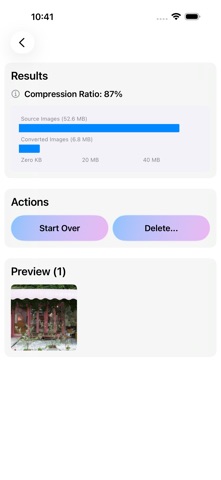
Kompressor (a compressor with a K!) is a powerful yet simple image converter for your iPhone and iPad. Convert your photos — RAW files from your iPhone or DSLR camera*, or standard lossy images already in your library — into compressed JPEG or HEIC formats while maintaining control over quality, size, and metadata. REQUIREMENT: You need existing photos in your Photo Library to convert. Kompressor does not capture photos — it converts the image files you already have. KEY FEATURES: Convert up to 25 images at once Support for both RAW and standard (JPEG, HEIC, PNG) input formats Support for JPEG and HEIC output formats Adjustable compression levels (50%, 75%, 95%) Flexible image resizing options Complete control over metadata preservation Detailed metadata options including EXIF, GPS, TIFF, and more Device-specific metadata support (Apple, Canon, Nikon, Fuji, Olympus, Pentax, Minolta) Comprehensive compression statistics and charts Preview converted images before saving Clean, intuitive interface 100% offline processing - no data collection Support for iPhone, iPhone Duo, and iPad METADATA CONTROL: Kompressor gives you granular control over which metadata to preserve: Image Depth & Orientation EXIF, GPS, and TIFF metadata IPTC information Camera manufacturer-specific data DNG metadata Custom creation date options COMPRESSION OPTIONS: Choose from three quality levels: 50% - Maximum compression for space savings 75% - Balanced quality and size 95% - Near-original quality with significant size reduction RESIZING OPTIONS: Reduce image dimensions while maintaining aspect ratio: 50% - Half the original size 75% - Three-quarters of original size 100% - Keep original dimensions PRIVACY FIRST: All processing happens directly on your device. No analytics, no tracking, no cloud processing. Your photos stay completely private. PERFORMANCE: Optimized for modern iOS devices with support for the latest iPhone and iPad models, including adaptive layout for iPhone Duo. The app limits batch conversions to 25 images to ensure optimal performance. Perfect for photographers who want to: Free up storage space by converting RAW or JPEG files Re-compress existing photos to smaller sizes Share photos in more compatible formats Control file sizes for uploads Manage photo metadata Convert images without complex desktop software Made with love in Toronto * Digital Negative (DNG) file Note: Photo library access is required to convert images.
What's new · 4.3
New in this version: - Optimized for iPhone Duo — the gallery, settings, and image preview adapt cleanly when you open, close, or resize the app. - More reliable layout on larger and resizable displays, including Split View. - General stability improvements.
Details