

Time Manage: Count-Up Timer
Hajime Nakamura · Productivity
Independent analytics for this App Store listing. AppTracker is not affiliated with Hajime Nakamura.
Chart standing · US
What changed · US
Listing changes AppTracker has observed for this app in this storefront — new versions, price moves, rating shifts, and store copy.
Fixed a crash that prevented the app from opening on iOS 27. We apologize for the trouble.
Ratings breakdown · US
The star breakdown behind this app's rating in this storefront.
In-app purchases · US
What this app sells inside itself, grouped by kind and priced for this storefront.
Screenshots



About
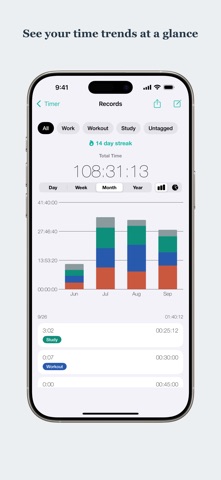
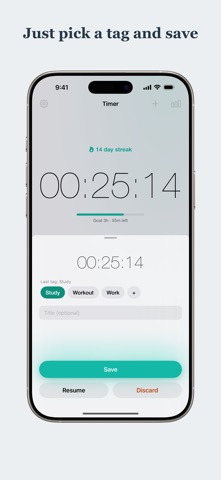
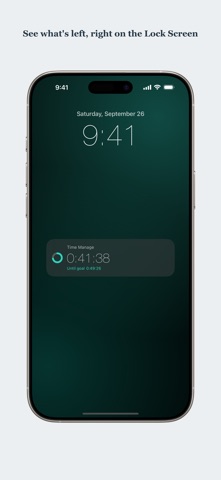
Where did your time go today? Time Manage is the simplest way to answer that question. It works with just two taps: start to begin timing, stop when you're done. Study, work, workouts—track any activity the moment you start it. Unlike full-blown time-tracking tools, there are no projects to configure and no mandatory setup. When you save, just pick a tag like Study, Work, or Workout—your last tag is already selected, so repeating an activity is a single tap. Tags are always optional; Time Manage does the rest. SEE WHERE YOUR TIME GOES - A pie chart breaks your time down by tag, so you finally know how you spend your days - A daily bar chart shows how your hours stack up, tag by tag - Check today's total and your all-time total at a glance BUILD A DAILY HABIT - A streak counter shows how many days in a row you've tracked—keep it alive! - A Home Screen widget puts today's total and your current streak right where you'll see them - While the timer runs, your elapsed time appears live on the Lock Screen and in the Dynamic Island (Live Activity)—no need to open the app - An optional, gentle evening reminder only when your streak is about to break - Set a daily goal and the widget, Lock Screen, and notifications all show how much is left (entirely optional) - Catch a timer you forgot to stop: when a session runs far longer than usual, one tap trims it to your typical length SIMPLE AND YOURS - Fully offline and private—no account, no sign-up - Multiple color themes with matching app icons Perfect for studying, deep work, focus sessions, workouts, and building better habits one day at a time. Track your time. See your day. Keep your streak going with Time Manage.
What's new · 6.6.2
Fixed a crash that prevented the app from opening on iOS 27. We apologize for the trouble.
Details